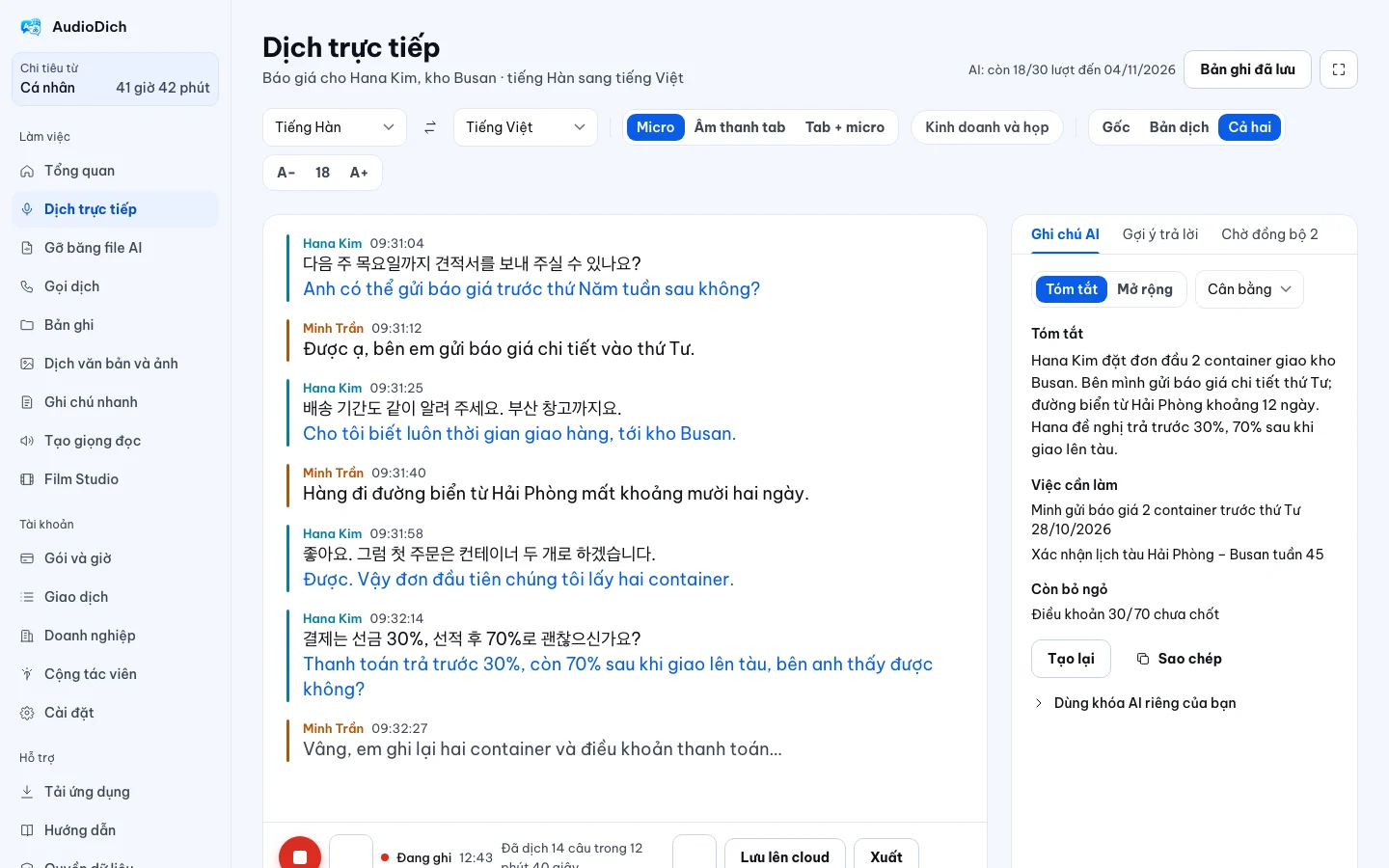
Download AudioDich for iPhone (App Store), Android (direct download), Windows, macOS, or Chrome, or use the web app. See each app's features, current version, and release history.
This is the public changelog. The current version and download link come from published release artifacts; add feature notes for each release so users can clearly follow changes.
Web App
Current v2026.11.15
v2026.11.152026-11-15
AI app connector: connect Claude or ChatGPT to AudioDich so it can read your transcripts and meeting recaps, read-only and text only, even the session in progress if you allow it. Available to every paid account.
v2026.11.092026-11-09
Highlight words on the live page and in recordings: click a word to see its pronunciation, part of speech and a short meaning, copy it or hear it.
v2026.11.082026-11-08
Recordings now lists files transcribed or translated with Cloud AI, with the translation and a button to replay the original file while the server keeps it.
A Buy hours entry now sits in the main menu, so you can add more time in one click.
v2026.10.242026-10-24
Studio: refine subtitles after transcription or translation using the film genre and address-term notes. Review suggestions before applying, with timing preserved. AI processing uses the configured Codex/OpenAI route.
v2026.10.232026-10-23
Meeting summary: after each session, AI summarizes the meeting and lists action items (one AI use). Free accounts see a preview; your own Gemini key unlocks the full summary.
AI Notes and Ask AI: paid plans and your own Gemini key show the full result (your own key uses no AI credits); free accounts see the first half.
Fixed: ending a live session no longer uses an AI credit in the background for a result nobody saw.
v2026.10.132026-10-13
Cleaner live translation lines: no glued words, late translations attach to the right line, and no translation-only lines or wrong 0:00 times. Original text appears as you speak, with the translation below.
Pause and resume live sessions, with floating subtitles when switching screens.
Session time stays continuous after reconnecting; paused status is easier to recognize.
v2026.10.122026-10-12
Improved text, link and status-label contrast in light mode.
The Saved button opens the recording library, showing recordings stored in the cloud and in this browser.
Fixed encrypted call recording downloads and cleanup of original and translated audio when deleted or expired.
v2026.09.142026-09-14
Synchronized 12 UI languages (vi, en, de, ja, zh, ko, pt, es, fr, it, id, th) across all client applications.
Realtime speech translation in the account area with original transcript, translation, subtitles, and source/target language selection.
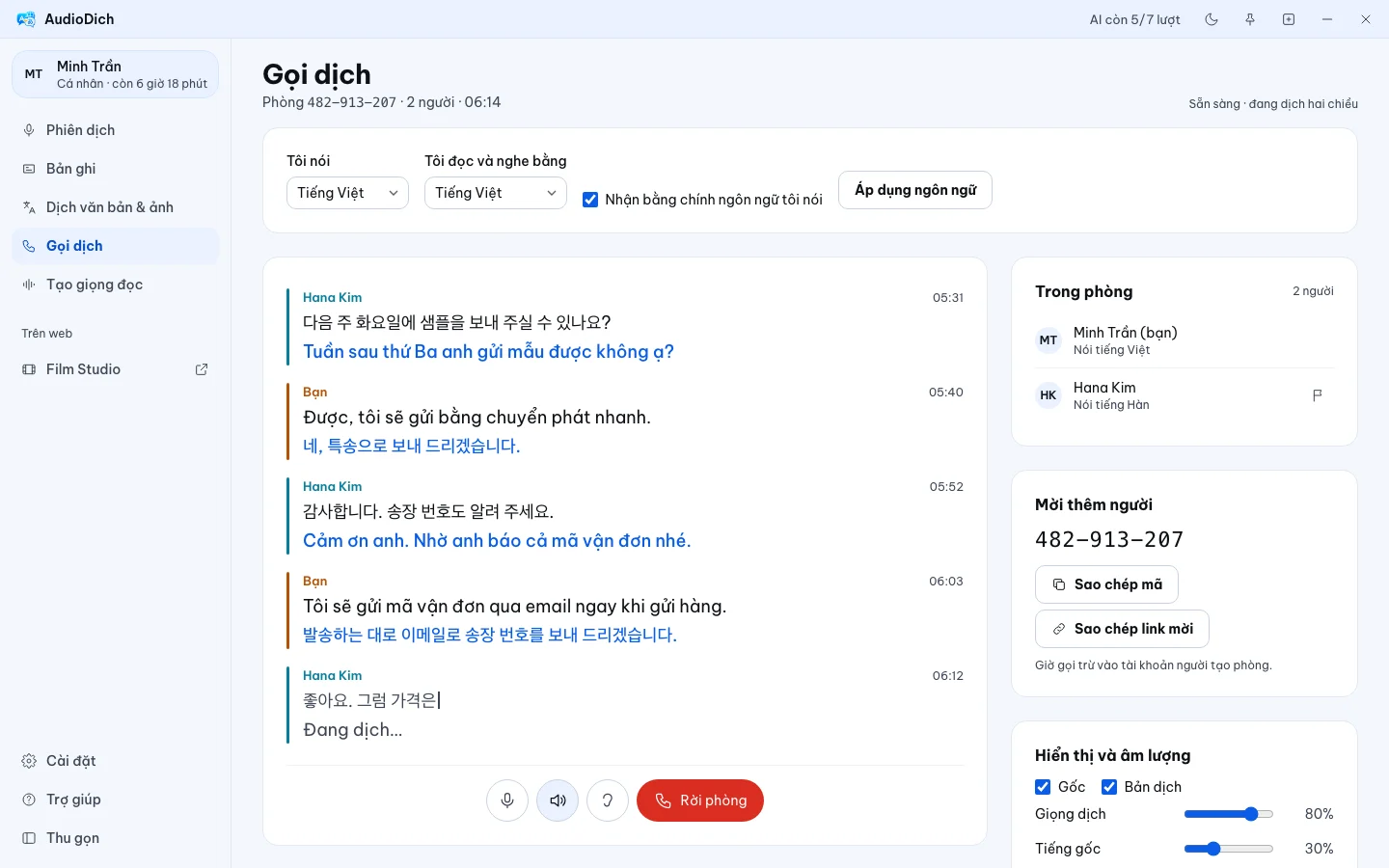
Two-way call rooms: create a code or link, guests join quickly, each side speaks their own language, and AudioDich displays and plays the translation.
Image translation/OCR: upload an image or receive a screenshot from the extension, detect text, translate it, and show block-level results.
v2026.06.272026-06-27
Image translation/OCR: upload an image or receive a screenshot from the extension, detect text, translate it, and show block-level results.
Improved mobile browser recording storage with an ArrayBuffer fallback when IndexedDB Blob storage is unstable.
Realtime speech translation in the account area with original transcript, translation, subtitles, and source/target language selection.
Two-way call rooms: create a code or link, guests join quickly, each side speaks their own language, and AudioDich displays and plays the translation.
Save recordings, transcripts, translations, processing history, and reopen saved work when the user chooses to store it.
v2026.062026-06-01
Vietnamese and multilingual voice audio for translated content, used in the account area, subtitles, and suitable call flows.
Account, shared included time, payments, purchase history, affiliate tools, and personal settings.
Initial release with the platform core features.
Chrome Extension
Current v1.1.44
v1.1.442026-11-21ZIP available; submitted to the Chrome Web Store and under review (the store still serves the previous version).
AI assistant (Interview mode): questions in languages that often skip the question mark, such as Japanese or Thai, are now recognized from their translation, so reply suggestions appear.
v1.1.432026-11-20ZIP available; Chrome Web Store retains its approved version.
Two-way translation (e.g. Korean ↔ Vietnamese): a reply in the other language now starts its own line with its own translation instead of being glued to the previous speaker's line.
v1.1.422026-11-17Built and prepared for release; not yet published.
Live transcription and translation use the newer speech model (Soniox v6), including when you use your own Soniox key.
v1.1.412026-11-08ZIP available; Chrome Web Store retains its approved version.
Subtitles stay visible when a video goes fullscreen, a new fullscreen subtitle view, and a Buy hours button in the popup and side panel.
v1.1.402026-11-02ZIP available; Chrome Web Store retains its approved version.
Fixed the subtitle overlay staying blank after turning subtitles off and on quickly or after the extension updated; long sessions render more smoothly and the audio connection recovers on its own.
v1.1.392026-10-23Built and prepared for release; not yet published.
Fixed tab audio capture failing to initialize, preventing subtitles and translation.
Expanded the transcript area, placed Pause beside Stop, and reduced spacing in the side panel.
v1.1.382026-10-23Built and prepared for release; not yet published.
Meeting summary: after each session, AI summarizes the meeting and lists action items (one AI use). Free accounts see a preview; your own Gemini key unlocks the full summary.
v1.1.372026-10-13Published for direct download
Cleaner live translation lines: no glued words, late translations attach to the right line, and no translation-only lines or wrong 0:00 times. Original text appears as you speak, with the translation below.
Pause and resume live sessions, with floating subtitles when switching screens.
ZIP available; Chrome Web Store retains its approved version.
v1.1.282026-09-14
Synchronized 12 UI languages (vi, en, de, ja, zh, ko, pt, es, fr, it, id, th) across all client applications.
Improved tab/microphone capture and local recordings for later review or optional sync.
Added simultaneous tab and microphone capture for two-way conversations.
v1.1.252026-09-02
Improved tab/microphone capture and local recordings for later review or optional sync.
Added simultaneous tab and microphone capture for two-way conversations.
Improved the start-translation dialog and localized language selection.
v1.1.162026-08-20
Improved tab/microphone capture and local recordings for later review or optional sync.
v1.1.152026-08-15
Added simultaneous tab and microphone capture for two-way conversations.
v1.1.142026-07-27
Improved the start-translation dialog and localized language selection.
v1.1.112026-06-27
The extension Image Translation button captures the current tab, opens the image translation page, and sends the screenshot for processing.
Improved mobile browser recording storage with an ArrayBuffer fallback when IndexedDB Blob storage is unstable.
Translate audio from any Chrome tab, including Zoom, Google Meet, Microsoft Teams, YouTube, webinars, and web audio.
v1.1.102026-06-24
Fixed long translated sentences being cut off during voice playback; audio chunks are kept in the correct order.
v1.1.72026-05-30
Updated referral wording to use policy-based eligibility instead of fixed bonus copy.
v1.1.62026-05-30
Resizable subtitle overlay with scrollable transcript and copy actions for full text, translation only, or original text only.
v1.1.52026-05-30
Resizable subtitle overlay with scrollable transcript and copy actions for full text, translation only, or original text only.
Save recordings, transcripts, translations, processing history, and reopen saved work when the user chooses to store it.
v1.0.92026-04-21
Fixed wrong-language voice fallback when the device has no matching local voice; server voice remains the primary path.
v1.0.82026-04-01
Initial release with the platform core features.
Translate audio from any Chrome tab, including Zoom, Google Meet, Microsoft Teams, YouTube, webinars, and web audio.
Desktop App
Current Windows v0.2.41 · macOS v0.2.67 · Linux v0.2.59
v0.2.672026-11-25macOS published; Windows awaits a separate build.
A live session that receives no sound now stops with a clear message instead of reconnecting over and over; when a session ends on an error, the microphone is released and the recording is saved.
When your AI uses for meeting summary and AI Notes run out, a Buy more AI uses button opens the AI packs page on the web.
Sign-in: in the Mac App Store app, Google and Apple sign-in open inside the app and no longer hang after you click Sign in; after too many attempts, the app tells you how long to wait.
On high-resolution displays (Retina, 4K), the window no longer opens too small with the sign-in buttons cut off.
v0.2.662026-11-22macOS published; Windows awaits a separate build.
Local AI: new downloads of the Vietnamese speech pack are now about 73 MB instead of 270 MB and use less memory, with the same accuracy.
v0.2.652026-11-22macOS published; Windows awaits a separate build.
Local AI (macOS): on-device translation now runs inside the app, so it also works in the Mac App Store version (Local mode there used to transcribe only), needs no extra setup on first use, and is faster.
v0.2.642026-11-22macOS published; Windows awaits a separate build.
Local AI: when you change the interface language, the Local AI section in Settings (selected pack, status, download progress) switches language right away, without restarting the app.
v0.2.632026-11-22macOS published; Windows awaits a separate build.
Local AI: French, German and Spanish speech is no longer skipped when the speaker is quiet or the microphone level is low, and new downloads of the European speech package use a more accurate model.
Local AI: messages shown while choosing and preparing on-device packages now appear in the app's language, and the balanced East Asia package shows its real download size (about 1 GB).
v0.2.622026-11-21macOS published; Windows awaits a separate build.
AI assistant (Interview mode): questions in languages that often skip the question mark, such as Japanese or Thai, are now recognized from their translation, so reply suggestions appear.
v0.2.612026-11-20macOS published; Windows awaits a separate build.
Exporting files (transcripts, recordings, receipts...) now opens a Save dialog so you choose where they go; in the Mac App Store version files are no longer silently lost.
v0.2.602026-11-20macOS published; Windows awaits a separate build.
Local AI: on-device translation now starts reliably on Windows the first time, and the app waits for the one-time setup instead of giving up.
Local AI: more accurate on-device recognition for Japanese, Korean and Chinese (Japanese was previously recognized incorrectly), and for French, German and Spanish on computers with 8 or more CPU threads. The new speech package downloads automatically the next time you use them.
The warning that on-device mode can't auto-detect the language now only appears when the source language is set to Auto-detect.
Monthly plans: a new Lite monthly plan; monthly prices are shown per purchase; each monthly purchase lasts 30 days and unused hours carry over when you renew before it ends (kept up to 60 days).
Monthly plan cards now list AI meeting-summary credits and cloud screen-video; the exact discounted price is shown when a promo code applies.
Usage history: plan names are now shown translated instead of internal codes.
v0.2.592026-11-17macOS and Linux published for direct download; the Mac App Store version is in review; Windows awaits a separate build.
Recordings have an Ask an AI app button: copy the transcript to paste into your AI app, or download it as a .md file to ask about it.
Words and phrases you highlight in recordings now sync across your devices on the same account.
When your AI allowance runs out, AI summaries and questions now say why instead of showing a generic error.
Transcript editing: a line without a time no longer offers a time field it cannot save, and a partly failed cloud save now shows exactly what was saved.
Live transcription and translation use the newer speech model (Soniox v6), including when you use your own Soniox key.
v0.2.58 (macOS)2026-11-14Published for direct download
System audio now captures WhatsApp, Teams and Zoom calls; on macOS 14.4+ it uses the System Audio Recording permission and shows a notice while waiting for you to allow it.
Highlight phrases of 2 to 5 words in a live session or a recording: select the words, then click inside the selection to highlight the phrase and look up its meaning.
AI Notes in live sessions and in recording details: choose a summary or expansion style, or write your own instruction; it also works with your own Gemini key.
New Translate files screen: upload audio or video up to 500 MB (pick or drop a file), follow its progress, play the original audio, open the transcript, export to TXT, SRT, VTT, JSON, DOCX, XLSX or PDF, and delete jobs.
Recordings: edit each line (speaker, start time, original text, translation), copy a share link for the transcript, and translate a recording again into another language.
Switching the audio source (microphone, system audio, both) mid-session now restarts the live session on the new source without losing the transcript.
Fullscreen subtitles: the subtitle window covers the screen with auto-fit text, text size controls, speaker names, pause and back to app; press Esc to leave.
v0.2.562026-11-09macOS and Linux published; Windows awaits a separate build.
With PayPal selected, plan prices are shown in US dollars.
v0.2.58 (Mac App Store)2026-11-14Built and prepared for release; not yet published.
Mac App Store: Sign in with Apple now happens inside the app instead of opening your browser.
Highlight phrases of 2 to 5 words in a live session or a recording: select the words, then click inside the selection to highlight the phrase and look up its meaning.
AI Notes in live sessions and in recording details: choose a summary or expansion style, or write your own instruction; it also works with your own Gemini key.
New Translate files screen: upload audio or video up to 500 MB (pick or drop a file), follow its progress, play the original audio, open the transcript, export to TXT, SRT, VTT, JSON, DOCX, XLSX or PDF, and delete jobs.
Recordings: edit each line (speaker, start time, original text, translation), copy a share link for the transcript, and translate a recording again into another language.
Switching the audio source (microphone, system audio, both) mid-session now restarts the live session on the new source without losing the transcript.
Fullscreen subtitles: the subtitle window covers the screen with auto-fit text, text size controls, speaker names, pause and back to app; press Esc to leave.
v0.2.57 (Mac App Store)2026-11-09Built and prepared for release; not yet published.
System audio now captures WhatsApp, Teams and Zoom calls; on macOS 14.4+ it uses the System Audio Recording permission and shows a notice while waiting for you to allow it.
v0.2.56 (Mac App Store)2026-11-09Replaced by the next version before review.
Record straight from Recordings, then transcribe or translate it; the text is saved into that same recording and can be synced to the cloud.
Recordings now lists files transcribed or translated with Cloud AI, with the translation and a button to replay the original file while the server keeps it.
A Buy hours entry now sits in the main menu, so you can add more time in one click.
Highlight a word in a live session or a recording and hover it to see its pronunciation, part of speech and a short meaning, or hear it read aloud.
v0.2.552026-11-08macOS and Linux published; Windows awaits a separate build.
Record straight from Recordings, then transcribe or translate it; the text is saved into that same recording and can be synced to the cloud.
Recordings now lists files transcribed or translated with Cloud AI, with the translation and a button to replay the original file while the server keeps it.
A Buy hours entry now sits in the main menu, so you can add more time in one click.
Highlight a word in a live session or a recording and hover it to see its pronunciation, part of speech and a short meaning, or hear it read aloud.
Fixed recordings synced to the cloud appearing twice in Recordings.
Fixed the Both source (microphone + system audio) producing no text: the two sources were sent one after the other at double speed instead of mixed. Both now mixes them properly, and your voice is no longer quieter while the meeting audio is playing.
Windows 10: the Microsoft Store package now installs the Visual C++ runtime with the app, so the VCRUNTIME140_1.dll missing error no longer appears on launch; a screen recording that cannot play on Windows N editions now explains the Media Feature Pack or VLC fix instead of wrongly saying the file is gone.
Fixed the app showing nothing at all in a live session right after installing from the Microsoft Store: a settings step at startup could fail before the screen subscribed to the recognizer, and it failed again on every launch.
v0.2.55 (Mac App Store)2026-11-08Replaced by the next version before review.
Record straight from Recordings, then transcribe or translate it; the text is saved into that same recording and can be synced to the cloud.
Recordings now lists files transcribed or translated with Cloud AI, with the translation and a button to replay the original file while the server keeps it.
A Buy hours entry now sits in the main menu, so you can add more time in one click.
Highlight a word in a live session or a recording and hover it to see its pronunciation, part of speech and a short meaning, or hear it read aloud.
v0.2.54 (Microsoft Store)2026-11-03Built and prepared for release; not yet published.
Fixed the app showing nothing at all in a live session right after installing from the Microsoft Store: a settings step at startup could fail before the screen subscribed to the recognizer, and it failed again on every launch.
Fixed the Both source (microphone + system audio) producing no text: the two sources were sent one after the other at double speed instead of mixed. Both now mixes them properly, and your voice is no longer quieter while the meeting audio is playing.
Windows 10: the Microsoft Store package now installs the Visual C++ runtime with the app, so the VCRUNTIME140_1.dll missing error no longer appears on launch; a screen recording that cannot play on Windows N editions now explains the Media Feature Pack or VLC fix instead of wrongly saying the file is gone.
v0.2.52 (Microsoft Store)2026-11-03Live on Microsoft Store
The Live translation screen now shows the input level next to "Listening", warns after 20 seconds without sound, and says when the Both mode could only use the microphone or only system audio.
Fixed the Microsoft Store version showing "Could not start screen recording": recording the screen or a window on Windows works again.
The app window now fits small screens: it no longer covers the Windows taskbar and can be resized smaller.
v0.2.50 (Microsoft Store)2026-11-02Live on Microsoft Store
The Live translation screen has a new card for livestreaming to international viewers in your own voice: create your cloned voice, turn it on for translations and open the TikTok LIVE Studio / OBS guide in one click.
Settings no longer shows an internal code as the name of your cloned voice, and the Translation call screen only warns about a missing cloned voice when that option is turned on.
v0.2.49 (Microsoft Store)2026-11-02Built and prepared for release; not yet published.
Fixed screen recording not working in the Microsoft Store version: the Store package was missing the recording component.
v0.2.48 (Microsoft Store)2026-11-02Live on Microsoft Store
Fixed live translation on Windows showing no text: on some PCs the Live screen stayed empty even though the audio was being translated.
Live translation uses less CPU: only new or changed lines are redrawn, and the subtitle window only receives text while it is open.
v0.2.48 (macOS)2026-11-02Published for direct download
Live translation uses less CPU: only new or changed lines are redrawn, and the subtitle window only receives text while it is open.
v0.2.47 (Microsoft Store)2026-11-02Live on Microsoft Store
Save recordings to a folder you choose (iCloud Drive on iOS, a folder or Google Drive on Android, a folder on desktop): audio, translation and screen video.
Translated calls are always saved on the caller's device, and the receiver sees a notice on the incoming-call screen and during the call.
Fixed the app still showing a Guest account after sign-in: the account profile now loads even if one request fails, and retries automatically.
v0.2.462026-10-23Built and prepared for release; not yet published.
Meeting summary: after each session, AI summarizes the meeting and lists action items (one AI use). Free accounts see a preview; your own Gemini key unlocks the full summary.
AI Notes and Ask AI: paid plans and your own Gemini key show the full result (your own key uses no AI credits); free accounts see the first half.
Storage-sync errors are now shown in the selected language instead of exposing English technical messages.
v0.2.45 (Microsoft Store)2026-10-21Live on Microsoft Store
Fixed non-responsive buttons on the sign-in screen when launching the app while signed out.
Automatic update for Windows via Microsoft Store; synchronizes sign-in fix and stability improvements.
v0.2.44 (macOS)2026-10-21Published for direct download
Fixed non-responsive buttons on the sign-in screen when launching the app while signed out.
macOS published; Windows awaits a separate build.
v0.2.43 (macOS / Linux)2026-10-13Published for direct download
Cleaner live translation lines: no glued words, late translations attach to the right line, and no translation-only lines or wrong 0:00 times. Original text appears as you speak, with the translation below.
macOS and Linux published; Windows awaits a separate build.
The Linux build uses online transcription and does not include local AI support.
v0.2.32 (macOS & Windows)2026-09-14
Redesigned 3-section ergonomic toolbar, relocated Settings button to top-right header, and enlarged center Hero Mic button.
Synchronized 12 UI languages (vi, en, de, ja, zh, ko, pt, es, fr, it, id, th) across all client applications.
Capture system audio and microphone input for meetings, videos, classes, webinars, and desktop calls.
v0.2.19 (Windows)2026-08-23
Improved reliability when loading profile and account information in the desktop app.
v0.2.16 (macOS Apple Silicon)2026-08-23
Updated the release package for the applicable platform.
v0.2.15 (macOS Intel / Linux)2026-08-22
Updated the release package for the applicable platform.
v0.2.52026-07-05
Added microphone and translated-voice output device selection in the desktop app; realtime voice playback speed now matches web and Chrome extension.
v0.2.42026-07-05
Fixed realtime translations splitting words when online/offline translation tokens arrive as small fragments.
v0.2.32026-07-05
Desktop/Tauri update endpoints support checking the latest version and downloading the correct platform build.
Capture system audio and microphone input for meetings, videos, classes, webinars, and desktop calls.
Local AI for privacy or weak connectivity; online mode remains the default for stable realtime quality.
v0.2.12026-06-27
Available as a Windows installer, macOS Apple Silicon build, macOS Intel build, Linux AppImage, and .deb package.
Capture system audio and microphone input for meetings, videos, classes, webinars, and desktop calls.
v0.2.02026-06-01
Initial release with the platform core features.
Capture system audio and microphone input for meetings, videos, classes, webinars, and desktop calls.
Android
Current v1.0.28
v1.0.33 (64)2026-11-28Built and prepared for release; not yet published.
Call invite links on audiodich.com now open the app directly, just like audiodich.io.vn links.
v1.0.32 (63)2026-11-21Submitted to Google Play and under review; not live yet.
The low-time warning now shows the recommended plan's name in the app's language.
v1.0.31 (62)2026-11-20Built and prepared for release; not yet published.
Two-way translation (e.g. Korean ↔ Vietnamese): a reply in the other language now starts its own line with its own translation instead of being glued to the previous speaker's line.
Monthly plans: a new Lite monthly plan; monthly prices are shown per purchase; each monthly purchase lasts 30 days and unused hours carry over when you renew before it ends (kept up to 60 days).
Usage history: plan names are now shown translated instead of internal codes.
v1.0.30 (60)2026-11-17Built and prepared for release; not yet published.
Ending a session no longer shows a "Recording saved" dialog: recordings still save automatically.
v1.0.29 (59)2026-11-17Live on Google Play
Translated calls: Create new room and join by code are back on the main screen, above direct calling.
The recordings list is easier to scan: two-line titles, one info line, a compact sync status shown only when needed, and Delete all moved into a More options menu; the list-wide speaker filter was removed.
Recordings have a new Ask an AI app button that sends the transcript to the AI app you use so you can ask about it.
Live transcription and translation use the newer speech model (Soniox v6), including when you use your own Soniox key.
v1.0.28 (58)2026-11-09Live on Google Play
Long-press a word in the live transcript or a recording to highlight it; tap it to see pronunciation, part of speech and a short meaning, copy it or hear it.
With PayPal selected, plan prices are shown in US dollars.
v1.0.27 (55)2026-11-08APK available for direct download; AAB prepared, this version is not yet published on Google Play.
A new Upgrade tab in the tab bar opens the plans directly, so you can add more time faster.
Full-screen subtitles: read the live translation in large text that fills the screen, handy when the phone faces the other person.
v1.0.26 (53)2026-11-02APK available for direct download; AAB prepared, this version is not yet published on Google Play.
Long sessions are now saved in full: Recordings keep every line from the start, not just the last 200, also when a draft is restored after an interruption.
On-device recognition: Pause and Resume now continue the same session instead of ending it.
The Live screen does less work per message, so long sessions stay smooth.
v1.0.25 (52)2026-11-02Built and prepared for release; not yet published.
Save recordings to a folder you choose (iCloud Drive on iOS, a folder or Google Drive on Android, a folder on desktop): audio, translation and screen video.
Translated calls are always saved on the caller's device, and the receiver sees a notice on the incoming-call screen and during the call.
v1.0.24 (50)2026-11-01Built and prepared for release; not yet published.
New Android design: redesigned Transcript, Translate, Recordings, Call, More and sign-in screens, with a floating tab bar and a tablet sidebar.
Direct calls: enter an email or AudioDich ID to ring every device the person has open, with missed calls and call back.
Call history screen: list of calls, transcript detail, recording, TXT sharing and delete.
v1.0.23 (47)2026-10-23Built and prepared for release; not yet published.
Meeting summary: after each session, AI summarizes the meeting and lists action items (one AI use). Free accounts see a preview; your own Gemini key unlocks the full summary.
AI Notes and Ask AI: paid plans and your own Gemini key show the full result (your own key uses no AI credits); free accounts see the first half.
Auto-read now uses Soniox's returned translation-language label, starts reliably, and speaks faster.
Fixed headphone auto-read not speaking; conversation mode now reads lines one after another, keeps the mic off until reading ends, and stops reading as soon as the speaker changes.
v1.0.22 (46)2026-10-22Published for direct download
Storage-sync errors are now shown in the selected language instead of exposing English technical messages.
v1.0.21 (45)2026-10-22Published for direct download
Automatic cloud audio sync for paid accounts. Free accounts save unlimited recordings locally on-device with free online transcript sync. Cloud audio is preserved for 30 days after plan expiration with clear warnings, and local recordings are never deleted.
v1.0.20 (44)2026-10-13Published for direct download
Cleaner live translation lines: no glued words, late translations attach to the right line, and no translation-only lines or wrong 0:00 times. Original text appears as you speak, with the translation below.
APK available for direct download; AAB prepared, this version is not yet published on Google Play.
v1.0.122026-09-23
Updated the release package for the applicable platform.
Mobile interface for transcripts, mode selection, language selection, and recording review.
v1.0.102026-09-14
Synchronized 12 UI languages (vi, en, de, ja, zh, ko, pt, es, fr, it, id, th) across all client applications.
On-device OCR with automatic production API fallback when cloud processing is needed.
Mobile interface for transcripts, mode selection, language selection, and recording review.
v1.0.82026-07-05
Updated the release package for the applicable platform.
v1.0.42026-06-27
On-device OCR with automatic production API fallback when cloud processing is needed.
Mobile interface for transcripts, mode selection, language selection, and recording review.
Save recordings, transcripts, translations, processing history, and reopen saved work when the user chooses to store it.
v1.0.32026-06-27
On-device OCR with automatic production API fallback when cloud processing is needed.
Mobile interface for transcripts, mode selection, language selection, and recording review.
Save recordings, transcripts, translations, processing history, and reopen saved work when the user chooses to store it.
v1.0.12026-06-27
On-device OCR with automatic production API fallback when cloud processing is needed.
Mobile interface for transcripts, mode selection, language selection, and recording review.
v1.0.02026-06-01
Initial release with the platform core features.
Mobile interface for transcripts, mode selection, language selection, and recording review.
Save recordings, transcripts, translations, processing history, and reopen saved work when the user chooses to store it.
iOS
Current v1.0.19
v1.0.23 (75)2026-11-28Built and prepared for release; not yet published.
Call invite links on audiodich.com now open the app directly, just like audiodich.io.vn links.
v1.0.22 (74)2026-11-21Live on App Store
The low-time warning now shows the recommended plan's name in the app's language.
v1.0.21 (73)2026-11-20Live on App Store
Two-way translation (e.g. Korean ↔ Vietnamese): a reply in the other language now starts its own line with its own translation instead of being glued to the previous speaker's line.
Monthly plans: a new Lite monthly plan; monthly prices are shown per purchase; each monthly purchase lasts 30 days and unused hours carry over when you renew before it ends (kept up to 60 days).
Usage history: plan names are now shown translated instead of internal codes.
v1.0.20 (72)2026-11-17Built and prepared for release; not yet published.
Ending a session no longer shows a "Recording saved" dialog: recordings still save automatically.
v1.0.19 (71)2026-11-17Live on App Store
Tapping to hear a translation now plays from the phone's loudspeaker when no headphones are connected, during and after a session, even with the silent switch on.
Translated calls: Create new room and join by code are back on the main screen, above direct calling.
Swipe from the left edge to go back from Settings, Account, Voice audio, Call history and Screen translate.
The recordings list is easier to scan: two-line titles, one info line, a compact sync status shown only when needed, and Delete all moved into a More options menu; the list-wide speaker filter was removed.
Recordings have a new Ask an AI app button that sends the transcript to the AI app you use so you can ask about it.
Live transcription and translation use the newer speech model (Soniox v6), including when you use your own Soniox key.
v1.0.18 (70)2026-11-09Live on App Store
A new Upgrade tab in the tab bar opens the plans directly, so you can add more time faster.
Long-press a word in the live transcript or a recording to highlight it; tap it to see pronunciation, part of speech and a short meaning, copy it or hear it.
v1.0.17 (69)2026-11-08Replaced by the next version before review.
A new Upgrade tab in the tab bar opens the plans directly, so you can add more time faster.
v1.0.16 (68)2026-11-07Live on App Store
Full-screen subtitles: read the live translation in large text that fills the screen, handy when the phone faces the other person.
First-purchase offer: during the offer period, some plans come with extra time, shown right in the plan list.
Optional offers and tips by notification: sent only if you agree, and you can turn them off in Settings.
v1.0.15 (67)2026-11-02Live on App Store
Long sessions are now saved in full: Recordings keep every line from the start, not just the last 200, also when a draft is restored after an interruption.
On-device recognition: Pause and Resume now continue the same session instead of ending it.
The Live screen does less work per message, so long sessions stay smooth.
v1.0.14 (66)2026-11-02Built and prepared for release; not yet published.
Save recordings to a folder you choose (iCloud Drive on iOS, a folder or Google Drive on Android, a folder on desktop): audio, translation and screen video.
Translated calls are always saved on the caller's device, and the receiver sees a notice on the incoming-call screen and during the call.
v1.0.13 (65)2026-11-01In App Review / TestFlight, not yet on the App Store
Apple Watch can now record and translate through your iPhone: the watch microphone is relayed to the iPhone session (iPhone unlocked with the app open). Turn it on in iPhone Settings, Apple Watch; the first time asks for confirmation.
Apple Watch can now get its translation access over its own Wi-Fi or cellular connection, without the iPhone nearby, once the iPhone has connected the watch. Signing out or turning the permission off in iPhone Settings revokes it.
Fixed: the Apple Watch app crashed on launch on Apple Watch SE and Series 4 to 8 (watches with 32-bit processors).
Direct calls: enter an email or AudioDich ID to ring every device the person has open, with missed calls and call back.
Call history screen: list of calls, transcript detail, recording, TXT sharing and delete.
v1.0.13 (64)2026-11-01Internal testing on TestFlight, not yet submitted to the App Store
Apple Watch can now get its translation access over its own Wi-Fi or cellular connection, without the iPhone nearby, once the iPhone has connected the watch. Signing out or turning the permission off in iPhone Settings revokes it.
When Apple Watch recording is turned off, the watch now tells you to allow it in AudioDich settings on the iPhone instead of showing a generic error.
v1.0.13 (63)2026-11-01Internal testing on TestFlight, not yet submitted to the App Store
Apple Watch can now record and translate through your iPhone: the watch microphone is relayed to the iPhone session (iPhone unlocked with the app open). Turn it on in iPhone Settings, Apple Watch; the first time asks for confirmation.
Apple Watch now shows a clear message after 15 seconds instead of staying on "Connecting" when it cannot reach the server.
v1.0.13 (62)2026-11-01Internal testing on TestFlight, not yet submitted to the App Store
Fixed: the Apple Watch app crashed on launch on Apple Watch SE and Series 4 to 8 (watches with 32-bit processors).
Call history screen: list of calls, transcript detail, recording, TXT sharing and delete.
v1.0.11 (52)2026-10-23In App Review / TestFlight, not yet on the App Store
Meeting summary: after each session, AI summarizes the meeting and lists action items (one AI use). Free accounts see a preview; your own Gemini key unlocks the full summary.
AI Notes and Ask AI: paid plans and your own Gemini key show the full result (your own key uses no AI credits); free accounts see the first half.
v1.0.11 (51)2026-10-22In App Review / TestFlight, not yet on the App Store
Automatic cloud audio sync for paid accounts. Free accounts save unlimited recordings locally on-device with free online transcript sync. Cloud audio is preserved for 30 days after plan expiration with clear warnings, and local recordings are never deleted.
Storage-sync errors are now shown in the selected language instead of exposing English technical messages.
Auto-read now uses Soniox's returned translation-language label, starts reliably, and speaks faster.
Fixed headphone auto-read not speaking; conversation mode now reads lines one after another, keeps the mic off until reading ends, and stops reading as soon as the speaker changes.
v1.0.102026-10-21Live on App Store
Cleaner live translation lines: no glued words, late translations attach to the right line, and no translation-only lines or wrong 0:00 times. Original text appears as you speak, with the translation below.
Call subtitles now merge late translations into the right line.
The recordings library now shows cloud transcripts from your other devices (purple tag), with filters for synced, on device and cloud.
Export to SRT, VTT, PDF and DOCX, create a public share link, ask AI about a recording, merge speakers, and see speaker names in your language.
In-app floating subtitles when you switch tabs during a live session. Optional subtitle notifications while the app is in the background (needs notification permission; without it the app does not use the microphone in the background).
v1.0.92026-10-10
Added an in-app rating prompt and small stability improvements.
v1.0.82026-10-10
A language bar and audio library on every app, full Soniox language coverage, and fixes for sign-up and the first session.
v1.0.72026-10-07
Sign in with Apple and Google, plus transcription of your recordings inside the app.
v1.0.42026-09-14
Synchronized 12 UI languages (vi, en, de, ja, zh, ko, pt, es, fr, it, id, th) across all client applications.
The iOS App for iPhone/iPad uses the same account as the web app and supports transcripts, recordings, sharing, and cloud/on-device modes.
Review recordings, replay audio, edit transcripts, share content, or create AI summaries from saved sessions.
v1.0.32026-07-05
The iOS App for iPhone/iPad uses the same account as the web app and supports transcripts, recordings, sharing, and cloud/on-device modes.
Review recordings, replay audio, edit transcripts, share content, or create AI summaries from saved sessions.
Includes Apple Watch companion connectivity groundwork in the iOS codebase for wearable workflows.
v1.0.12026-06-27
The iOS App for iPhone/iPad uses the same account as the web app and supports transcripts, recordings, sharing, and cloud/on-device modes.
Review recordings, replay audio, edit transcripts, share content, or create AI summaries from saved sessions.
Includes Apple Watch companion connectivity groundwork in the iOS codebase for wearable workflows.
v1.0.02026-06-01
Initial release with the platform core features.
Mobile interface for transcripts, mode selection, language selection, and recording review.