

Translate English to Vietnamese by voice, both ways
Press the mic below, speak English and read the Vietnamese translation as it appears in the demo. Need to reply? Switch to two-way mode to speak Vietnamese and see English. For long meetings, calls or videos, AudioDich adds live subtitles and a transcript you can review.
Try a live translation
Start with a short sentence to check the language pair, microphone, and translation in your browser.
Try a familiar sentence before using it live
Use a short sentence with a number, product name, or appointment to check both speech recognition and translation. The examples below are references for testing, not a guarantee of accuracy in every context.
Video hướng dẫn Web App: đăng nhập AudioDich, chọn ngôn ngữ, bật dịch trực tiếp và kiểm tra transcript realtime.
Choose the workflow for your audio source
- Open the translation page and select the language pair in the direction you need. For Vietnamese to Korean, Japanese, or Chinese, select Vietnamese as the spoken language and the other language as the target; reverse them for the opposite direction.
- If speaking into your device, use the microphone and keep it about a handspan away. For a video or meeting in Chrome, use the extension to select the tab playing audio. On macOS, use system audio capture as described in the app guide. iPhone and iPad work with speech captured by the mic; do not assume a website can directly capture audio from YouTube or a meeting app on the same device.
- Start, speak or play a short 10–20 second clip, then check the source transcript first. If the transcript is wrong, check the language, microphone, volume, and background noise before judging the translation.
- Review the translation alongside the transcript. Confirm names, numbers, units, dates, and commercial terms separately. Stop the session after testing; save or share a transcript only if you need to.
If no translation appears
- No incoming audio: check microphone permission, selected device, system volume, and whether the status indicates listening.
- Transcript appears without translation: check translation mode and source/target direction, then wait for the short utterance to finish.
- Words are unstable or misrecognized: reduce noise, avoid overlapping speakers, move the microphone closer, and try a shorter sentence.
- A technical term is wrong: add product names or specialist terms to context if supported, then compare with the transcript and confirm in writing.
Choose a device for the audio you need to translate
- Chrome on a computer: best suited to audio from a browser tab, such as YouTube, webinars, or browser meetings.
- macOS: use the microphone for speech nearby; use system audio capture for another app and grant the macOS permissions requested.
- iPhone/iPad: use the microphone for conversation or sound playing through a speaker. For YouTube on the same device, try the supported microphone workflow or switch to a computer to capture the tab directly.
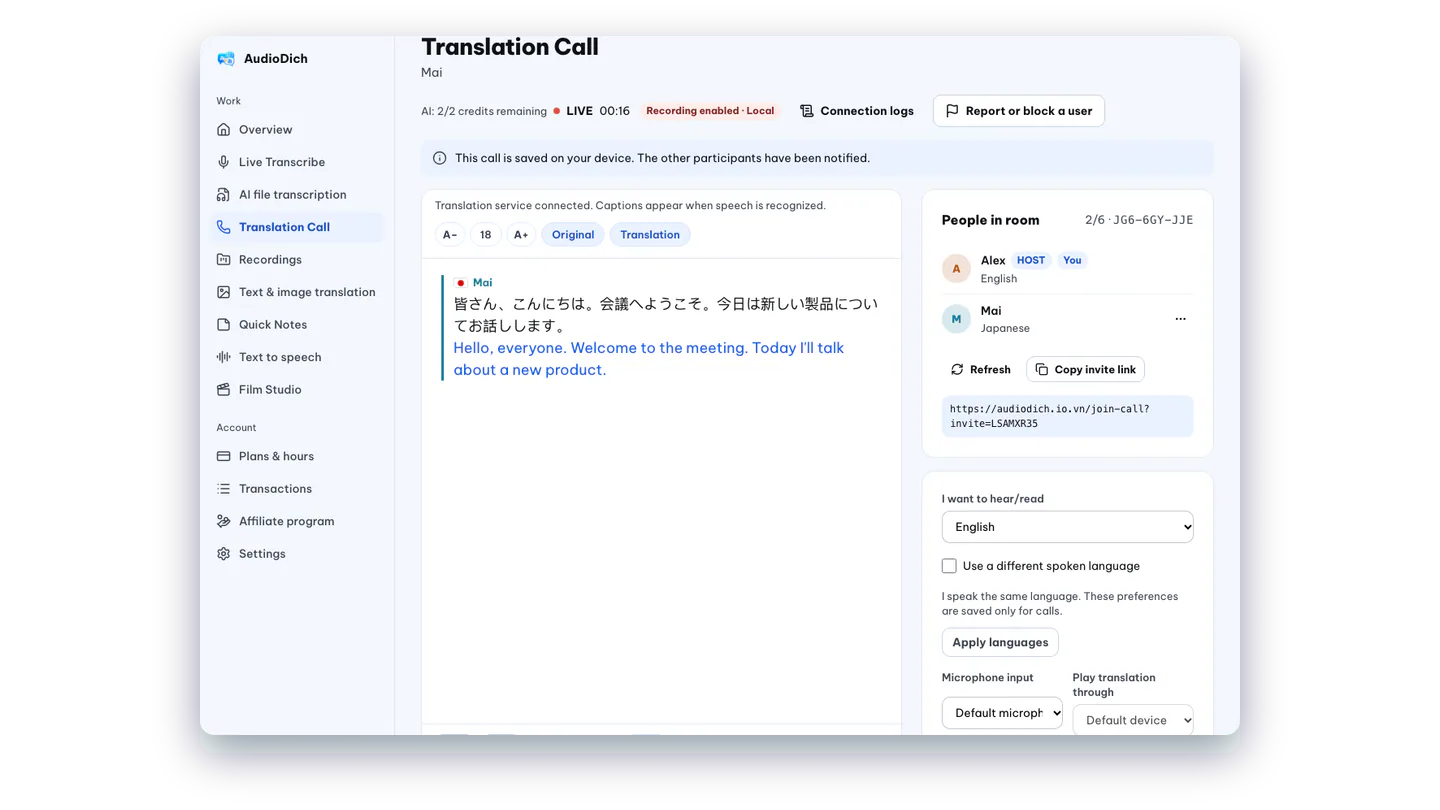
- Two-way calls: use a call room when both people need to speak their own language; check headphones and audio routing before the real call.
Business Information
Official operator information and contact channels for AudioDich.
- Vietnamese registered name
- HỘ KINH DOANH HỘ KINH DOANH NGUYỄN LÊ TOÀN
- Household business registration No. (also the tax code)
- 035085005366
- Phone
- 0943 943 647
- Support email
- letoan_ng [at] yahoo.com.hk
How to translate English to Vietnamese by voice
In the demo the language pair is already set to English to Vietnamese. Press the mic, allow microphone access, speak in clear sentences and read the Vietnamese translation in the next pane.
Each demo session on this page stops after 3 minutes; create an account to keep going with your trial included time. See the pricing page for plans.
Two-way: speak Vietnamese, answer in English
Choose the two-way mode in the demo so each sentence is translated into the other language. You can flip the language pair with the swap button.
When two people talk, the Call Room lets each side speak their own language and see the translation in the same call.
Common situations
Meetings with overseas partners, calls with English-speaking customers, interviews, webinars and videos without Vietnamese subtitles are the moments when you need to hear English and read Vietnamese right away.
For videos or meetings in the browser use the Chrome Extension to capture tab audio; for all computer audio use the desktop app. Test with the exact device you will use.
Compared with a quick-translate tool
A quick tool like Google Translate is handy for a few sentences. AudioDich is aimed at longer conversations: it can take audio playing on your computer through the Chrome Extension or desktop app, lets two people speak two languages in the Call Room and keeps a transcript for review.
Automatic translation can be wrong on names, figures and terminology; for important content, check it against the transcript.
FAQ
Short answers to choose the right AudioDich process before using it in a real session.
Is English to Vietnamese voice translation on AudioDich free to try?
You can try it with your microphone right on this page; each demo session stops after 3 minutes. Create an account to continue with your trial included time, and see the pricing page for plans.
Can I speak Vietnamese and answer in English?
Yes. Use the two-way mode in the demo or the Call Room so each side speaks their own language and sees the translation.
Can AudioDich translate English audio playing on my computer?
Yes. Use the Chrome Extension for browser audio and the desktop app for all computer audio. Test with your own device first.
Can I review what was translated?
There is a transcript you can review and check after the session. For important content, verify names, figures and terminology.
Is the translation perfectly accurate?
No. It is automatic translation, and quality depends on audio, noise and accent. Use it as listening support and confirm important details.
Start with AudioDich
Try AudioDich in a real meeting, video, or call. When you need more time, compare hourly and monthly plans.