

Meetings with foreign clients and suppliers: sales calls, sourcing and supplier talks
You do not need to speak your partner's language to run a good sales call or a supplier negotiation. Create a call room, send a link, and each side speaks their own language while reading and hearing the translation; for calls on a chat app on your computer, live subtitles and a transcript keep prices, quantities and dates on record.
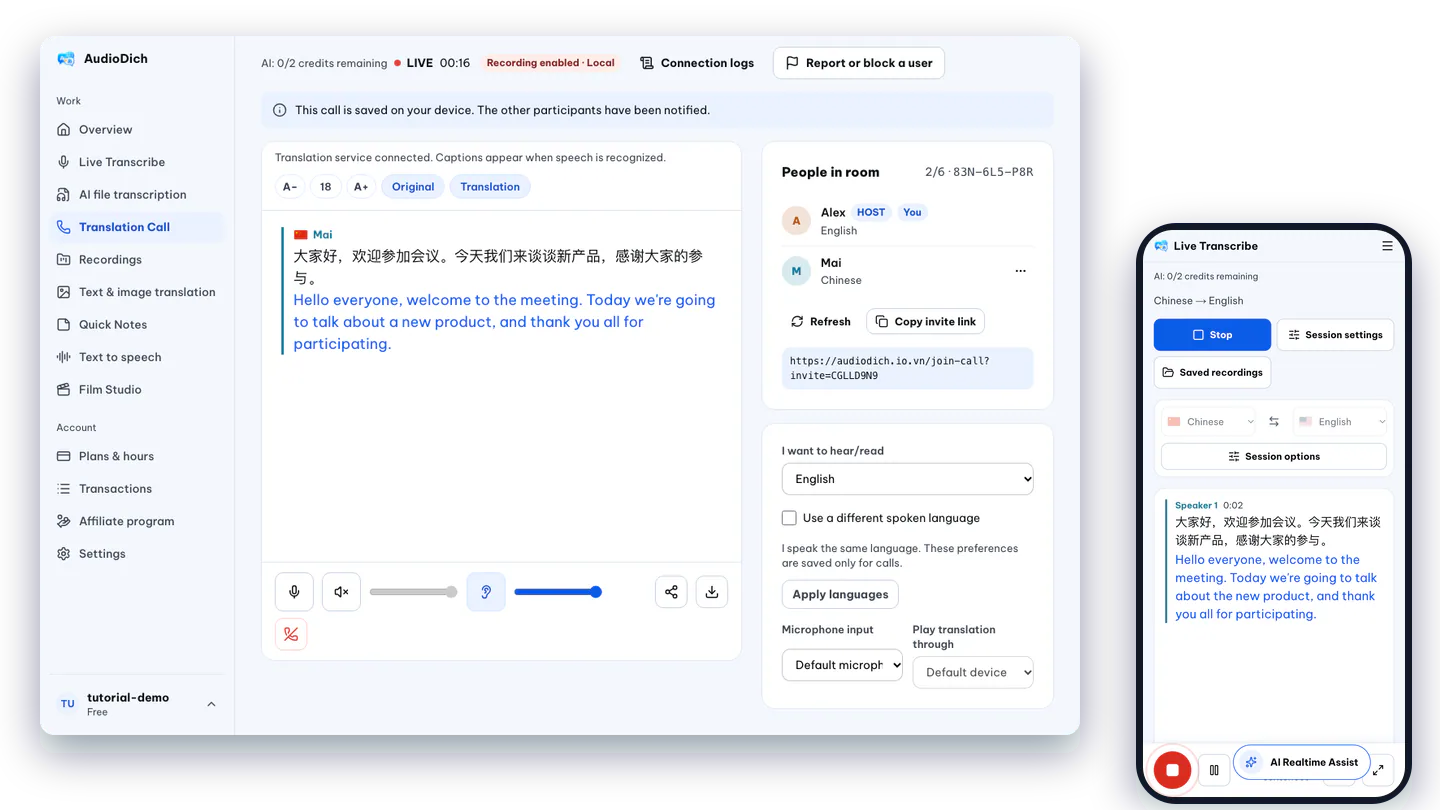
Real problems of calls with overseas clients and suppliers
Prices, quantities and specs slip away in a call
On a call with a factory or a client, mishearing one number for price, minimum quantity or delivery date can throw the whole order off. Asking again and again breaks the rhythm.
Calls happen on chat apps and at trade fairs, not in meeting software
The factory calls on a chat app, the client messages on another, a partner stands at a fair stall. There is no meeting room in which to switch on built-in captions.
No record to check against afterwards
Without a transcript next to a translation, it is hard to show what was agreed, especially when orders and payment terms are settled by voice.
How a call with a foreign partner works in AudioDich
Four steps, each a real screenshot. Your partner needs no app and no account.
- Step 1
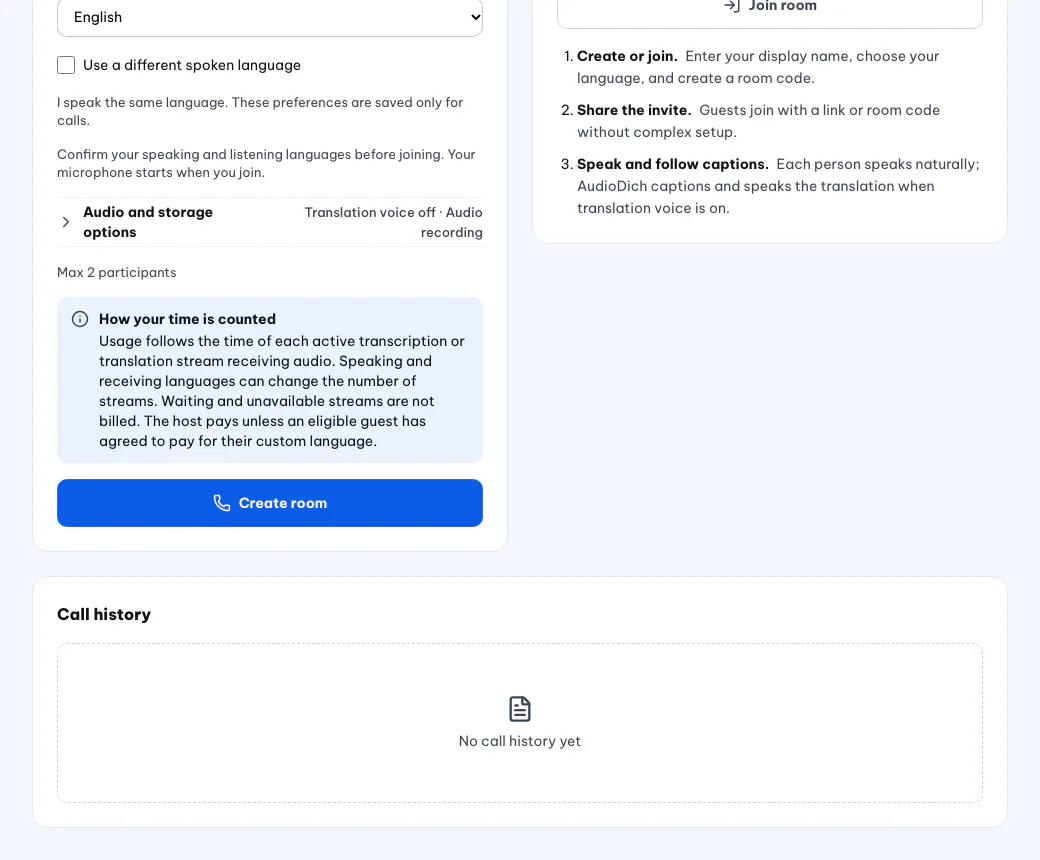
Create a call room and choose your language
In AudioDich open Translation Call, type your name, choose the language you want to read and hear, and create the room.
- Step 2
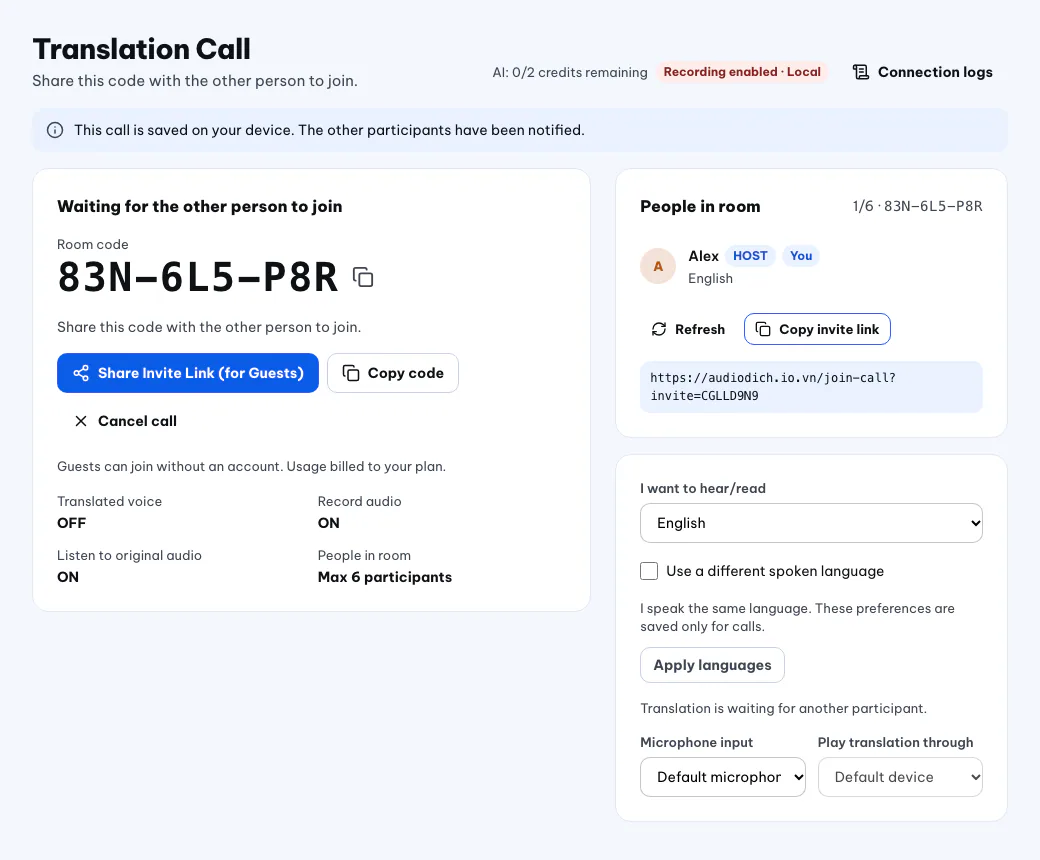
Send the invite link to your partner
You get a room code and an invite link; send it by chat app or email. Your partner opens it without installing an app or creating an account.
- Step 3
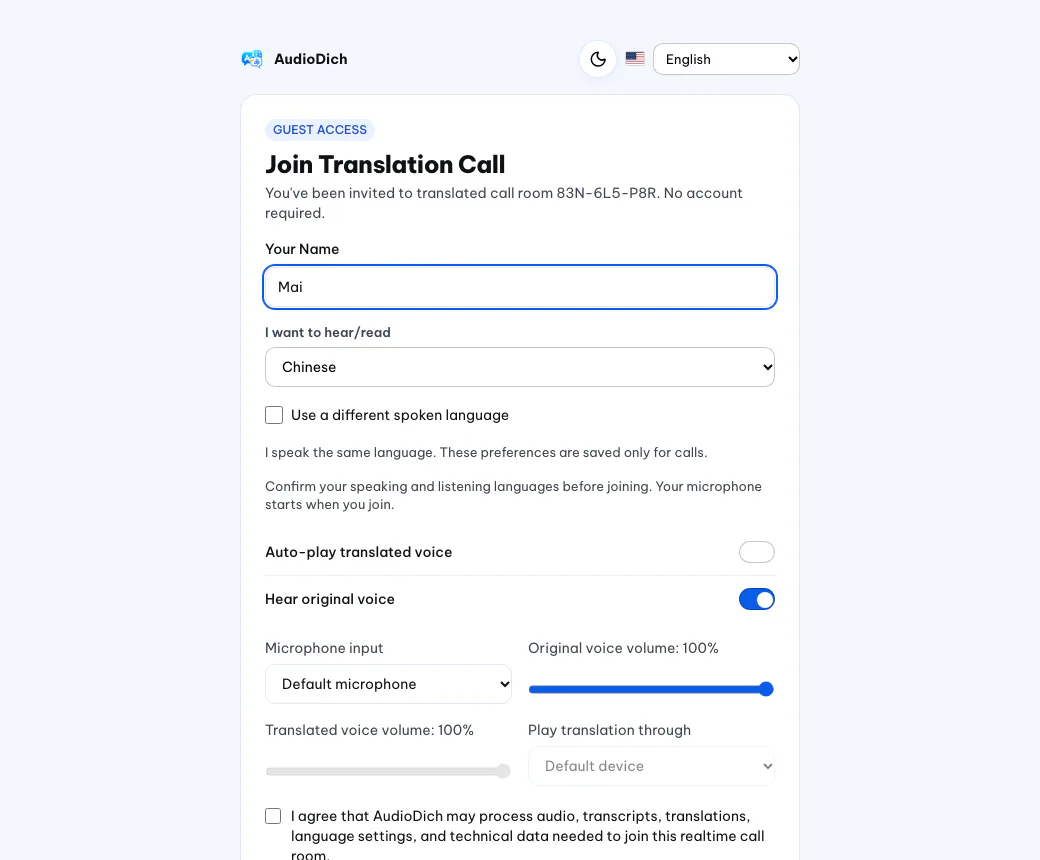
Your partner joins in their own language
They type a name, choose the language they want to read or hear, tick the data-processing consent and press join.
- Step 4
For chat-app calls: live transcription and a saved record
For a call on a chat app on your computer, use live transcription with the system audio of the desktop app. The record keeps the original next to the translation so you can check prices and quantities, edit it, download it or have AI Notes summarise it.
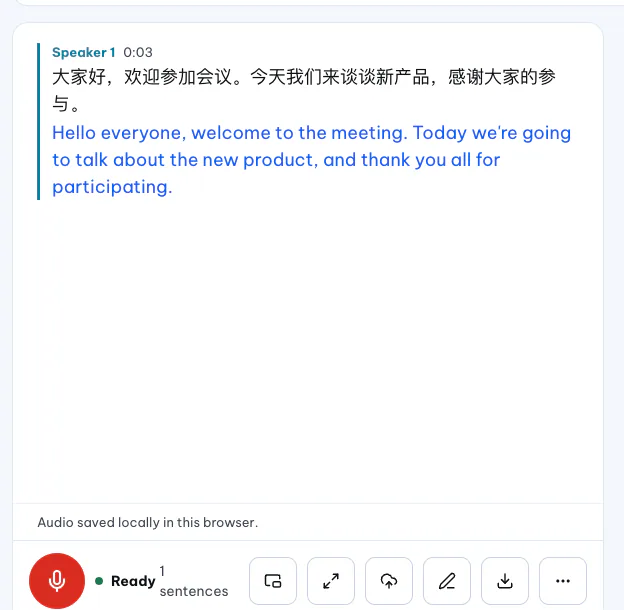
Two views of a two-way call room
When both sides want to speak their own language and hear the translation, open an AudioDich call room next to Zoom: you create the room, send the link, and your guest joins without an account.
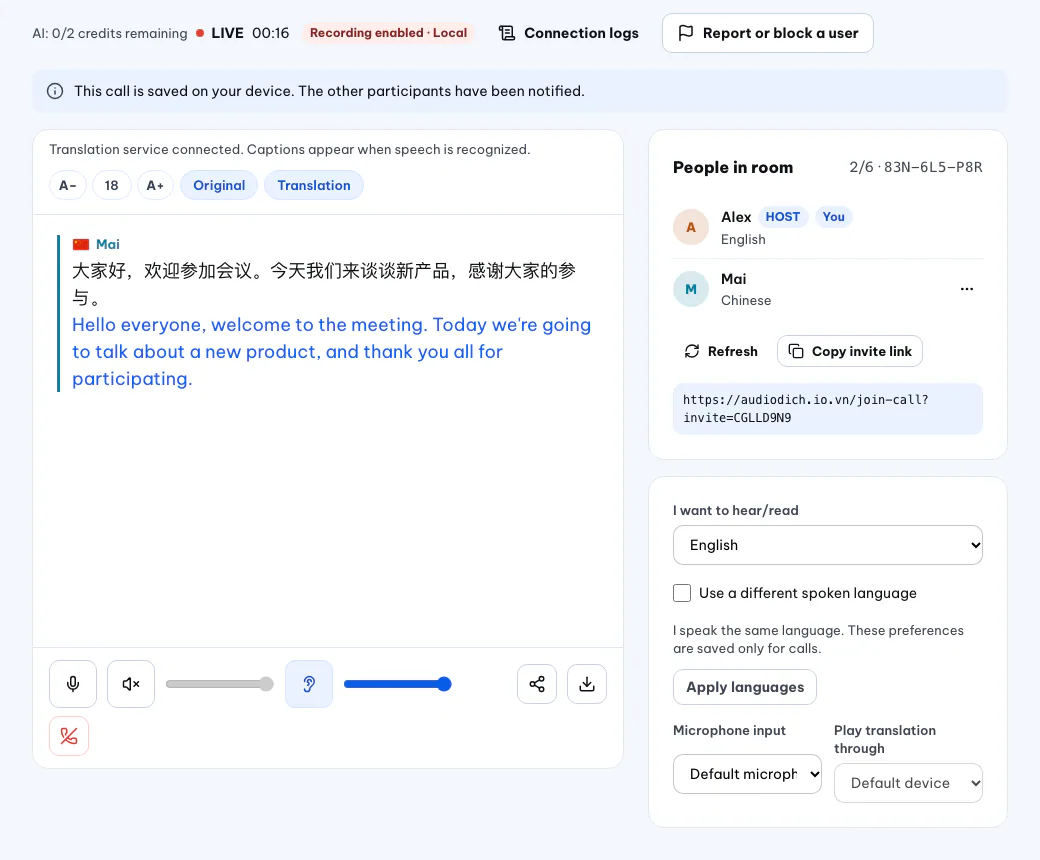
The person who creates the room (you)
You see who is in the room, each person's language, and every sentence as the original with its translation.
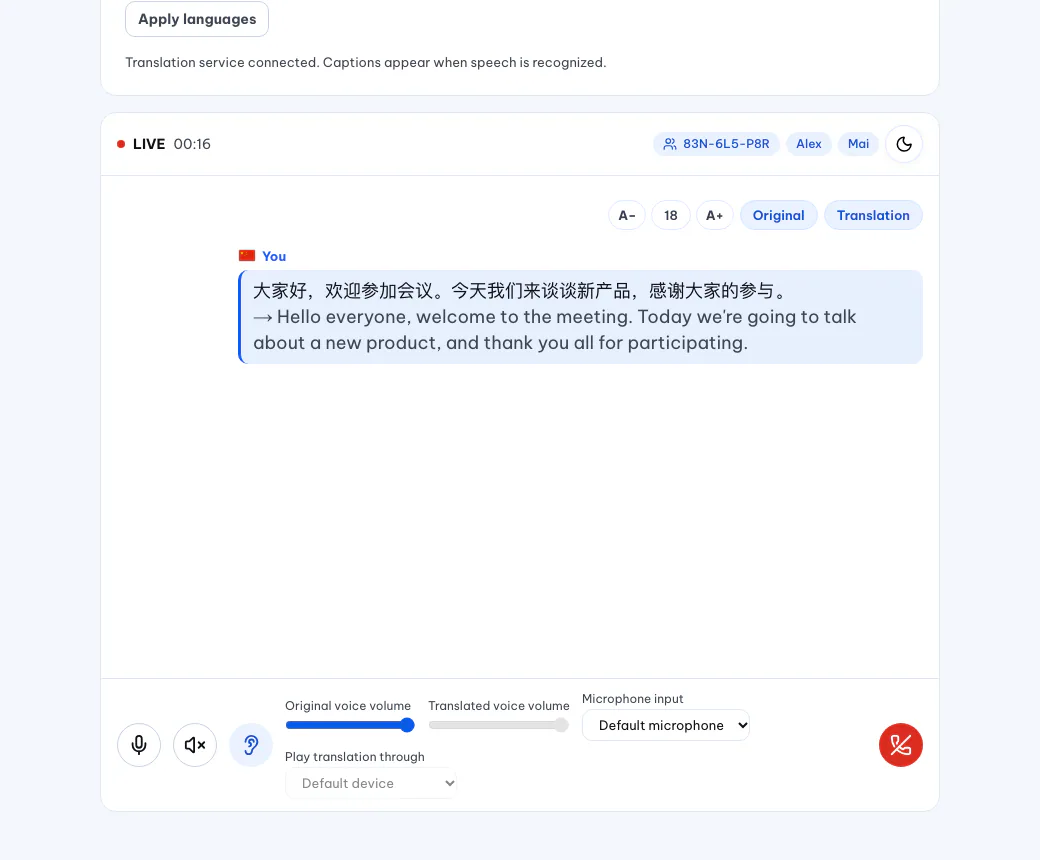
The partner who joins by link
Your partner only opens the link, types a name and picks a language. No app to install and no account to create.
Which apps it works with
AudioDich listens to the audio on your computer instead of plugging into each app, so there is no plug-in to install and it works alongside the meeting, calling and video apps you already use.
 Zoom
 Microsoft Teams
 Google Meet
 Zalo
 WhatsApp
 Messenger
 WeChat
 KakaoTalk
 LINE
Zoom, Microsoft Teams, Google Meet, Zalo, WhatsApp, Messenger, WeChat, KakaoTalk and LINE are trademarks of their respective owners. AudioDich is not affiliated with or endorsed by these companies; the logos only show the apps you can translate alongside.
Main features for sales and supplier meetings
Two-way call room
Each side speaks their own language; guests join by link with no account. Free: 2 people; paid plans: up to 6 people in one room.
Live transcription of chat-app calls on a computer
The desktop app on macOS and Windows captures system audio, so calls on WeChat, Zalo or WhatsApp on a computer can be translated live; more than 60 languages, including Chinese, Japanese and Korean.
Conversation mode on your phone
The mobile apps have a two-way conversation mode for two speakers, handy when you meet in person at a trade fair or a factory.
Transcript and AI Notes
Save the session to review and download. AI Notes summarises it and lists decisions and action items, using the AI credits in your account.
Comparison: AudioDich, a human interpreter and typing each sentence into a translation app
Each way suits a different situation. This table helps you choose quickly; it is not meant to rule any of them out.
| Criteria | AudioDich | Human interpreter | Typing each sentence into a translation app |
|---|---|---|---|
| Preparation | Create a room, send a link; your partner installs nothing. | Book ahead and agree time and place. | None, but you type constantly. |
| Conversation pace | Both sides just talk; the translation appears sentence by sentence. | Turn-taking, with a person relaying between the two sides. | Slow: every sentence needs a pause to type and read. |
| Language each side uses | Each side speaks and reads their own language. | Depends on the interpreter you hire. | Each side has to type and read for themselves. |
| Record after the call | A transcript with the translation to check against. | Usually none unless requested separately. | You have to copy it down yourself. |
| Cost and accuracy | Free trial, then pay by the hour; machine translation can get names, numbers and specs wrong, so confirm in writing. | Paid by the hour and booked ahead; best for contracts and large negotiations. | Free or cheap but error-prone and slow. |
This table compares ways of working and names no specific product. For prices, quantities and technical specs, always confirm in writing after the call.
Business Information
Official operator information and contact channels for AudioDich.
- Vietnamese registered name
- HỘ KINH DOANH HỘ KINH DOANH NGUYỄN LÊ TOÀN
- Household business registration No. (also the tax code)
- 035085005366
- Phone
- 0943 943 647
- Support email
- letoan_ng [at] yahoo.com.hk
Calls with overseas suppliers
Working with a factory abroad often runs on chat-app calls, voice messages and a few short meetings about samples, prices, minimum quantities and delivery dates. A call room lets both sides speak their own language while seeing the same record; for calls on a computer, live transcription keeps the original next to the translation so you can check before confirming an order.
Sales calls with foreign clients
Foreign clients often ask detailed questions about terms, deadlines and after-sales. Subtitles and a transcript help you hear the question correctly, answer to the point and send a summary for the client to confirm. If you save a transcript or a recording, tell the other side.
Quick answers
The questions people ask most before using AudioDich with clients and suppliers abroad.
Does my foreign partner have to install AudioDich?
No. For a call room they only open the link, type a name and choose a language; no app and no account.
Can I use it for WeChat, Zalo or WhatsApp calls?
On a computer, yes: the AudioDich desktop app captures system audio, so a chat-app call can be translated live. On a phone, use a call room or the conversation mode, because a phone does not let one app record another app's audio.
What about meeting in person at a fair or a factory?
The mobile apps have a two-way conversation mode for two speakers: put the phone between you and each person speaks their own language.
Is the translation accurate enough for prices and specs?
Machine translation can get names, numbers and terms wrong. Use AudioDich to understand and keep a record, but always confirm prices, quantities and specs in writing; for large contracts, use an interpreter.
How are audio and data handled?
AudioDich processes audio to create transcripts, translations, subtitles or spoken translation depending on the features you turn on, and only saves them when you enable storage or choose to save. If you save a transcript or a recording, tell the participants.
Which languages and what does it cost?
More than 60 languages, including Chinese, Japanese, Korean and English. Your first sign-in includes a 20-minute free trial, then 10 minutes every day, with no credit card; for more, see the Pricing page.
Start with AudioDich
Try AudioDich in a real meeting, video, or call. When you need more time, compare hourly and monthly plans.